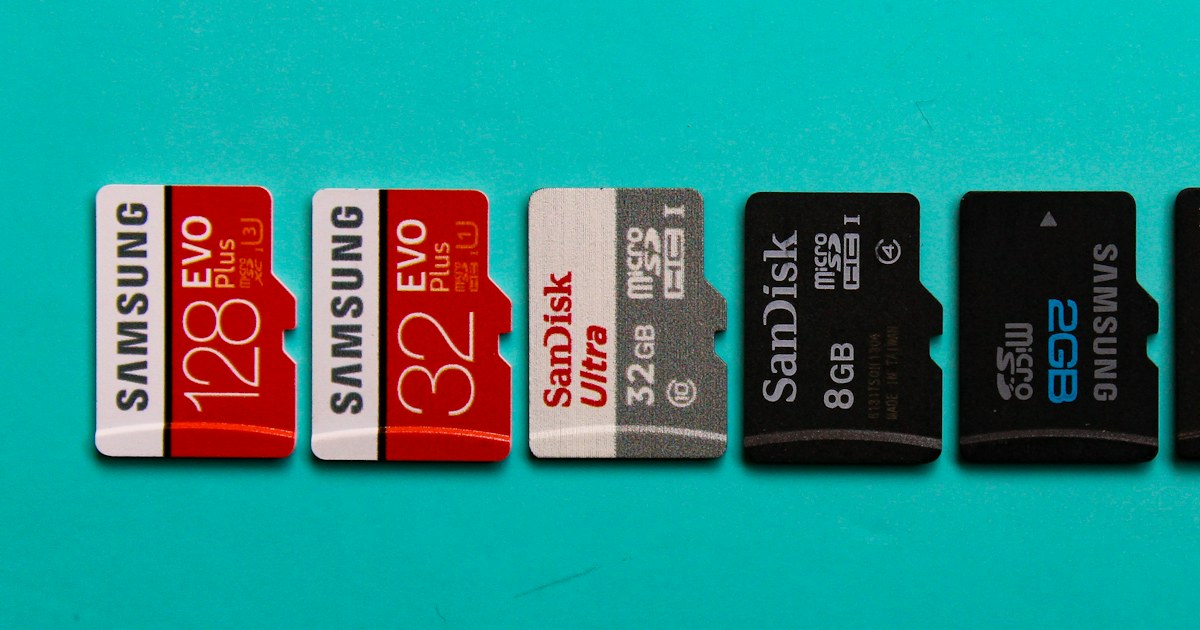
A microSD card usually carries five or six logos: SDXC, a 10 inside a C, a U with a 3 in it, V30, A2, and a speed printed in large type. Each one answers a specific question: how much it holds, what write speed it guarantees, how fast it runs apps. Here is how to read them and which ones matter for your device.
Capacity: SDHC, SDXC and the file system
The letters next to the SD logo give the capacity range. An SDHC card holds more than 2 GB and up to 32 GB and ships formatted in FAT32. An SDXC card holds more than 32 GB and up to 2 TB and ships in exFAT.
This has two consequences. An older device that only supports SDHC will not read a 64 GB card. And under FAT32 a single file cannot exceed 4 GB, so a camera splits long videos into several files. That is normal.
Before buying, look up the maximum capacity in the device manual. Many security cameras and dashcams stop at 128 or 256 GB. A larger card may simply not be recognised.
Speed classes: what each number guarantees
All speed classes describe the same thing: a minimum sustained write speed, meaning what the card can keep up continuously while recording video.
- Class 10 (the 10 inside a C): 10 MB/s minimum write.
- U1: 10 MB/s minimum. U3: 30 MB/s minimum.
- V10: 10 MB/s, V30: 30 MB/s, V60: 60 MB/s, V90: 90 MB/s minimum.
The V class is the newest and the easiest to read: the number is the guaranteed speed. A V30 card is necessarily at the level of U3 and Class 10.
A1 and A2: the application class
The A1 and A2 logos have nothing to do with video. They measure speed on small scattered files, which is what installed apps do. A1 guarantees 1500 read and 500 write operations per second. A2 goes up to 4000 and 2000, but only if the phone supports A2 features. Otherwise an A2 card behaves roughly like an A1.
Read or write: the trap of the big number
The figure printed large on the packaging, such as 100 or 140 MB/s, is almost always a maximum read speed. It tells you how fast files copy to a computer, not whether the card can keep up with a 4K camera.
The UHS-I bus is specified up to 104 MB/s. Higher figures are reached with a compatible reader from the same manufacturer.
For video, look at the V or U class. Some product sheets also give a maximum write speed: the SanDisk Extreme PRO 128 GB SDXC states up to 90 MB/s write and the Kingston Canvas Select Plus 256 GB up to 85 MB/s, both rated V30.
| Marking | What it guarantees | Where it is enough |
|---|---|---|
| Class 10, U1, V10 | 10 MB/s continuous write | Full HD video, security camera, dashcam |
| U3, V30 | 30 MB/s continuous write | 4K video, action camera, drone |
| V60, V90 | 60 or 90 MB/s continuous write | Mirrorless cameras filming 4K or 8K at high bitrate |
| A1 | 1500 / 500 operations per second | Apps and photos on a smartphone |
| A2 | 4000 / 2000 operations per second | Recent smartphone with A2 support |
Which card for which device
Security camera
An IP camera records day and night and keeps rewriting the same card. A Full HD camera writes well below 10 MB/s, so speed is not the issue. Wear is: each memory cell tolerates a limited number of writes.
Endurance cards (High Endurance, Max Endurance depending on the brand) are built for this loop recording. If you do not use one, pick at least a V30 card from a known brand and plan to replace it more often. Our memory cards for security cameras include models such as the Imou S1 64 GB card, from the same brand as many Wi-Fi cameras.
Always format the card from the camera app, not from a computer. And check from time to time that a recent clip plays back: a worn card can still show up in the app while it no longer records.
Dashcam
Same loop recording, with one more constraint: heat. In summer a car parked in the sun gets far hotter than a room. Check the operating range on the product sheet. The Kingston Canvas Select Plus 64 GB, for example, states -25 °C to 85 °C. 64 to 128 GB is enough for most dashcams, and formatting once a month from the device limits corrupted files.
Smartphone and tablet
Here the A class matters, especially if you move apps to the card. A1 is the minimum, A2 is worth it if the phone supports it. The SanDisk Ultra 128 GB microSDXC A1 covers everyday use (photos, music, downloaded videos). The Samsung EVO Plus 256 GB combines A2, U3 and V30 for a phone that also films in 4K.
Before buying, check that the phone actually has a microSD slot and the maximum capacity it accepts. iPhones have none.
4K camera, photo camera, drone
For 4K, most manufacturers require U3 or V30. Below that, the device refuses to record or stops after a few seconds. Action cameras and drones take a microSD: the HIKSEMI C1 128 GB V30 and the Philips Ultra Pro 128 GB are among our V30 memory cards.
Mirrorless and DSLR cameras mostly use the full-size SD card. See our SD memory cards. For burst shooting and high-bitrate 4K, read the manual: some bodies require V60 or V90.
Fake cards: how to check real capacity
A fake card is usually a small chip whose controller has been reprogrammed to report a larger capacity. The phone shows 256 GB, so does the file manager, but beyond the real capacity new files overwrite older ones or become unreadable.
Warning signs: a very high capacity from an unknown brand, packaging with no reference or code, a speed claim with no V or U class at all.
The only reliable test is to fill the card completely and then read back what was written:
- On Windows, the free H2testw tool writes check files over all the free space and then verifies them.
- On Linux and macOS, F3 does the same with the f3write and f3read commands.
- The test takes a while on a large card. Run it right after purchase, before storing anything.
- If the report shows corrupted sectors or a smaller real capacity, the card is not usable.
Looking at the drive properties is not enough, since that is exactly the value being faked.
Our advice by use
- Security camera: an endurance card if possible, otherwise a V30 card from a known brand, 64 to 128 GB depending on the manual. Format from the app.
- Dashcam: 64 to 128 GB, temperature range checked, monthly formatting.
- Smartphone: microSDXC A1 at least, A2 if the phone supports it. Our 128 GB memory cards cover most needs.
- 4K and drone: U3 or V30 at least, and a stated maximum write speed if you film for long.
- Any new card: a full capacity test before first use.
All models in stock, by capacity and format, are in our memory cards section.


